Finance · Free
by Audit Tax And Book Advisor
Expense Manager & Money Pro
Smart Budget & Finance Manager
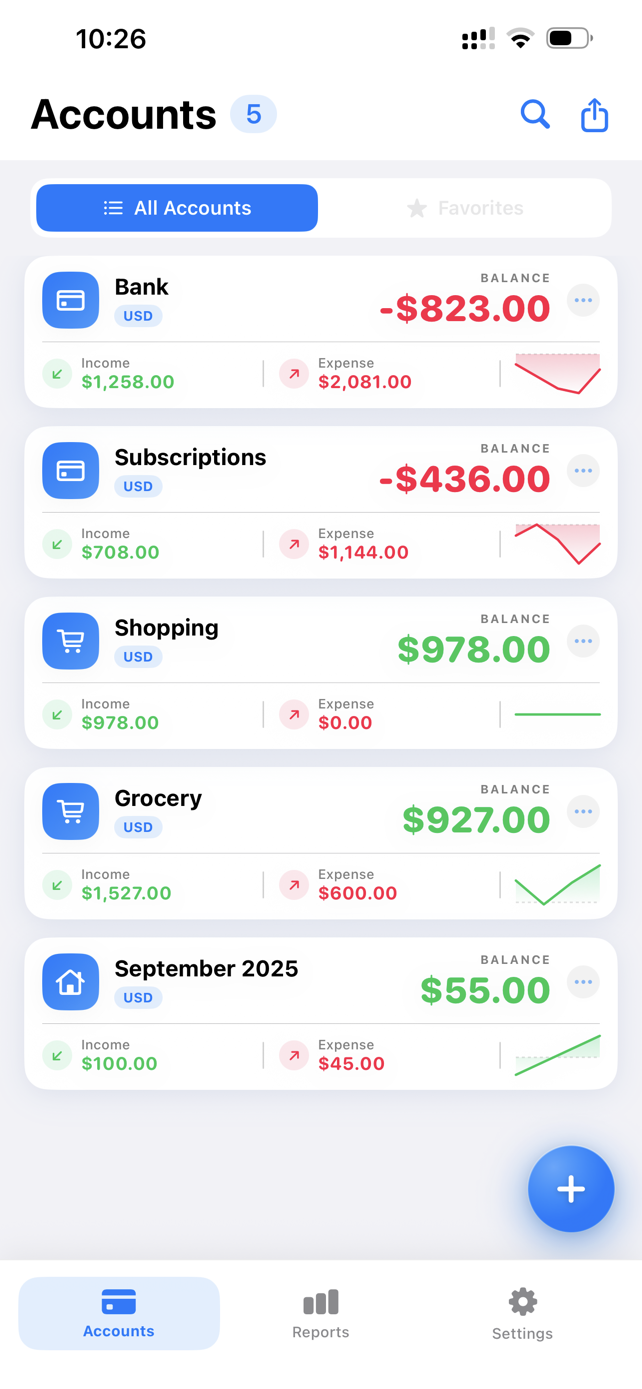
Track expenses and income across multiple accounts, attach receipts and warranty cards, set payment reminders and export clean PDF or CSV reports. Works offline and syncs through iCloud.
- iPhone
- iPad
- Mac
- Apple Vision
- Price
- Free
- Category
- Finance
- Age rating
- 9+
- Size
- 16.7 MB
- Version
- 2.0
Case Study
From shoebox receipts to one-tap reports
The Challenge
Our accounting clients kept arriving at tax season with the same problem: expenses scattered across bank SMS alerts, food-delivery apps, shopping receipts in email and paper bills in drawers. Reconstructing a year of spending took hours, and deductible expenses were routinely missed. Most budgeting apps either demanded bank logins, which many people refuse to share, or were too complicated to use every day.
Our Approach
- Designed a privacy-first, account-based ledger that needs no bank login. Data stays on the device and in the user's own iCloud.
- Made the attachment the core of every transaction. Receipts, bills and warranty cards are stored with the entry they prove.
- Built offline-first so logging an expense at a shop counter or on a flight never fails.
- Added accountant-ready PDF and CSV exports so records drop straight into bookkeeping and ITR workflows.
- Shipped one codebase natively across iPhone, iPad, Mac and Apple Vision.
The Outcome
- Year-end paperwork reduced to a single export
- Proof of purchase saved with every transaction
- One ledger on every Apple device
- Zero bank credentials required
Features
Everything you need to master your money
Multiple Accounts
Keep cash, bank, card and wallet balances separate, each with its own history of debits and credits.
Fast Transactions
Log an expense or income in seconds, assign a category, and edit it any time.
Receipts & Warranty Cards
Attach bills, receipts and warranty cards to any transaction so the proof is there when you need it.
Payment Reminders
Get reminded before rent, subscriptions, EMIs and utility bills are due.
Reports & Charts
See where the money goes by category and account, with charts that make spending patterns obvious.
Export to PDF & CSV
Share clean statements with your accountant or import them into a spreadsheet in one tap.
iCloud Sync
Your data follows you across iPhone, iPad and Mac through your own private iCloud account.
Works Offline
No signal? No problem. Everything works on-device and syncs once you are back online.
How it works
Up and running in minutes
- 1
Create your accounts
Add cash, bank accounts and cards with their opening balances.
- 2
Log and attach
Record expenses and income, pick a category and snap the receipt.
- 3
Review and export
Check reports and charts, then export PDF or CSV whenever you need it.
Built for
Made for the way you spend
Individuals & Families
Build a monthly budget, see where the money goes and never miss a bill.
Freelancers
Separate business and personal spending and keep receipts ready for tax time.
Small Business Owners
Track petty cash and vendor payments and hand clean statements to your CA.
Privacy you can see
Your financial records stay on your device and in your private iCloud. No bank login is ever required. As declared on App Store:
Data used to track you
- Identifiers
- Usage Data
Data not linked to you
- Device ID
- Product Interaction
- Advertising Data
Pricing & compatibility
Download
Free
Pro Features (optional)
$19.99
- iPhoneiOS 18.0 or later
- iPadiPadOS 18.0 or later
- MacmacOS 15.0 or later
- Apple VisionvisionOS 2.0 or later
- LanguagesEnglish
Prices shown are from the US App Store store and may vary by region.
Frequently asked questions
Is Expense Manager & Money Pro free?
Yes. The app is free to download and use. An optional Pro Features in-app purchase ($19.99 in the US store; local pricing may vary) unlocks additional capabilities.
Do I need to connect my bank account?
No. You enter transactions yourself, so you never share bank credentials with the app or with us.
Where is my financial data stored?
Your transactions and attachments are stored on your device. If you enable iCloud, they sync through your own private iCloud account. We do not run a server that holds your financial records.
Does it work without internet?
Yes. The app is fully functional offline. Changes sync over iCloud when your device reconnects.
Which devices are supported?
iPhone (iOS 18+), iPad (iPadOS 18+), Mac (macOS 15+) and Apple Vision (visionOS 2+).
Can I export my data for my accountant or ITR filing?
Yes. Export transactions and reports as PDF or CSV and share them with your CA or open them in any spreadsheet app.
Take control of your money today
Free to download. No bank login. Works offline on every Apple device.