


Productivity · Free
by Audit Tax And Book Advisor
Findr Docs
Scan, Organize & Find Files
Scan or import any document and the built-in AI reads it, works out what it is, files it in the right folder and gives it a clear name. Then ask in plain language, like "When does my passport expire?", and Findr Docs finds the answer. All AI runs privately on your iPhone.
- iPhone
- iPad
- Mac
- Apple Vision
- Price
- Free
- Category
- Productivity
- Age rating
- 4+
- Size
- 2.2 MB
- AI processing
- On-device
Case Study
From piles of paper and camera-roll photos to answers on request
The Challenge
Important documents end up scattered across paper piles, camera-roll photos, downloads and email attachments. Finding a passport expiry date or last month's electricity bill means scrolling through hundreds of images, and most scanner apps only store files without understanding them. Cloud AI tools can help, but uploading IDs and medical reports to someone else's server is a privacy risk.
Our Approach
- Used on-device AI, including Apple Intelligence on supported iPhones, to recognize each document's type and suggest a folder and a descriptive name.
- Ran text recognition (OCR) on every scan, photo and PDF so search works on the words inside a document, not just its file name.
- Added an AI Assistant that answers plain-language questions and pulls out totals, expiry dates and other key details.
- Built album import that keeps real documents and skips ordinary photos, so a camera roll can be cleaned up in one pass.
- Kept everything private: no account, no data collection, App Lock, and optional sync through the user's own iCloud.
The Outcome
- Documents filed and named automatically
- Search by the text inside every file
- Answers to plain-language questions
- All AI processing on the iPhone
Features
AI that files, names and finds your documents
AI Assistant
Ask in plain language, like "When does my passport expire?" or "Bills from March", and get the right documents with totals, dates and key details pulled out.
Automatic Sorting
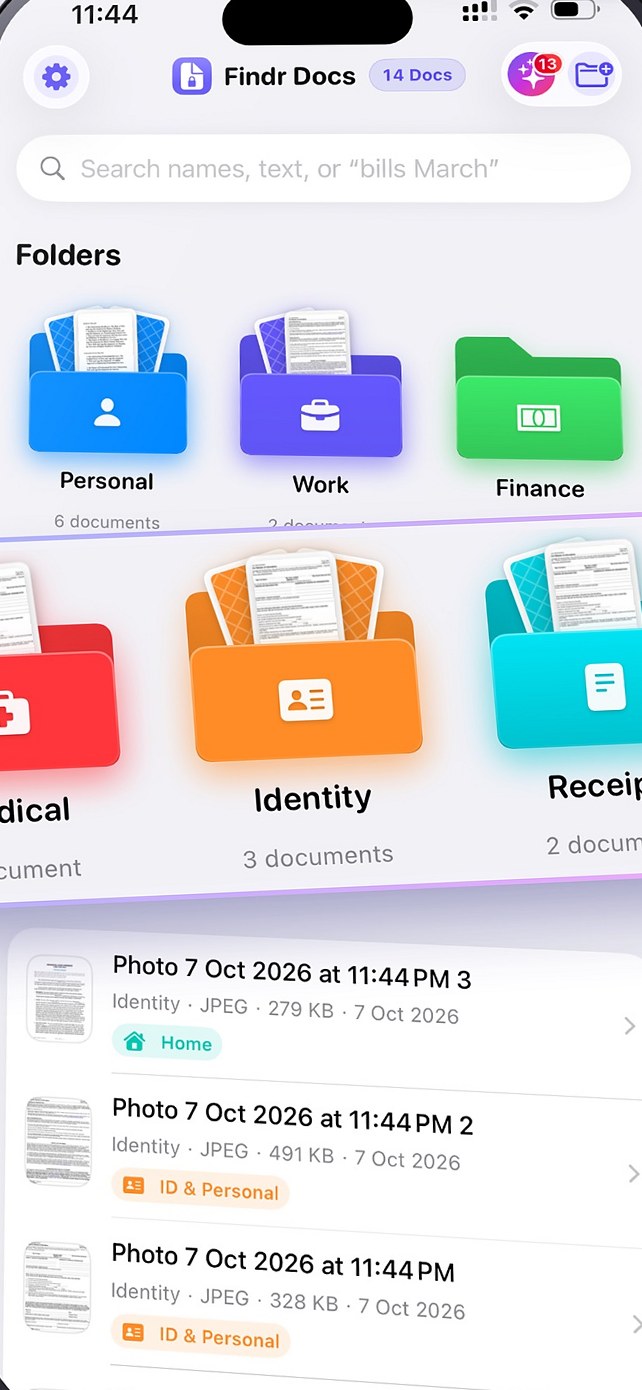
AI recognizes IDs, bills, receipts, medical reports, insurance policies, tickets and certificates and files each one in the right folder with a clear name.
Smart Collections
Browse every Finance, Medical, Travel, Vehicle, Legal or Home document in one place, and import a photo album while AI skips ordinary photos.
Search Inside Files
On-device text recognition reads every scan, photo and PDF, so you can search for what is written inside, like "electricity bill march".
Scan & Import
Scan paper into clean multi-page PDFs with your camera, import from Files or Photos, and preview PDFs, images and Office documents in the app.
App Lock
Protect your documents with Face ID, Touch ID, your passcode or a 4- or 6-digit PIN. The app locks when you leave and hides in the app switcher.
Free iCloud Sync
Folders and documents sync through your own private iCloud to your other devices. Turn sync off to keep everything on your iPhone.
Private, On-Device AI
Uses Apple Intelligence on supported iPhones and on-device recognition on others. Your documents are never uploaded to an AI server.
How it works
Up and running in minutes
- 1
Scan or import
Use your camera, or pick documents from Files, Photos or a whole album.
- 2
Let AI file it
Review the suggested folder and name, then accept with one tap.
- 3
Just ask
Search the text inside your files or ask the AI Assistant a question.
Built for
Made for anyone who keeps important papers
Families & Households
Keep IDs, insurance policies, school certificates, warranties and home bills organized and ready when you need them.
Freelancers & Small Businesses
Capture receipts and invoices on the go, find them by amount or month, and keep records tidy for tax time.
Travellers & Patients
Have passports, tickets, medical reports and prescriptions on your iPhone, locked and searchable in seconds.
Privacy you can see
No account and no data collected. All AI runs on your iPhone, documents are never uploaded to an AI server, and sync happens only through your own private iCloud. As declared on App Store:
Data not collected
- The developer does not collect any data from this app
Pricing & compatibility
Download
Free
- iPhoneiOS 18.0 or later
- iPadiPadOS 18.0 or later
- MacmacOS 15.0 or later (Apple M1 or later)
- Apple VisionvisionOS 2.0 or later
- LanguagesEnglish
Prices shown are from the US App Store store and may vary by region.
Frequently asked questions
Is Findr Docs free?
Yes. Findr Docs is free to download on the App Store, with no in-app purchases and no sign-up.
How does the AI organize my documents?
When you scan or import a document, on-device AI reads it, recognizes what it is (an ID, bill, receipt, medical report, insurance policy, ticket, certificate and more) and suggests the right folder and a clear name. You can review and accept the suggestion with one tap.
Are my documents uploaded to an AI server?
No. All AI processing happens on your iPhone. On supported iPhones Findr Docs uses Apple Intelligence; on other iPhones it uses on-device text recognition and classification. Your documents are never sent to an AI server.
Do I need an iPhone with Apple Intelligence?
No. Apple Intelligence powers the AI Assistant on supported iPhones, and every other iPhone running iOS 18 or later gets on-device text recognition and smart classification for the same organizing and search features.
Can I search the text inside my documents?
Yes. Text recognition (OCR) reads every scan, photo and PDF, including scanned PDFs, so you can search by what is written inside a document, for example "electricity bill march".
How are my documents protected?
Turn on App Lock to require Face ID, Touch ID, your iPhone passcode or a 4- or 6-digit PIN. The app locks whenever you leave it and hides your documents in the app switcher.
Does it sync between my devices?
Yes. Folders and documents sync for free through your own private iCloud to every device signed in to your Apple Account. You can turn sync off to keep everything only on your iPhone.
Does Findr Docs work with Siri and Shortcuts?
Yes. Ask Siri or use Shortcuts to find, open or save documents, and saved files are sorted automatically. Your documents also appear in iPhone search (Spotlight).
Let AI organize your documents
Free on the App Store. No sign-up. Everything stays private on your iPhone.